Back to School Computer Security Review
Back to School, Computer Security, Madison Heights IT Support
The $50 Back to School Security Review: What's Included and Who It's For
Back to school season is busy enough without worrying if your family or work computer is slow, cluttered, or unsafe. Connected Geek in Madison Heights, MI is launching a limited-time back to school security review—a friendly, no-pressure, $50 computer tune up designed for homes, remote workers, and small businesses across Southeast Michigan. Booking opens August 1, 2026 and runs through October 31, just in time for fall routines.

What You Get for $50: A Clear, Practical Computer Security Check
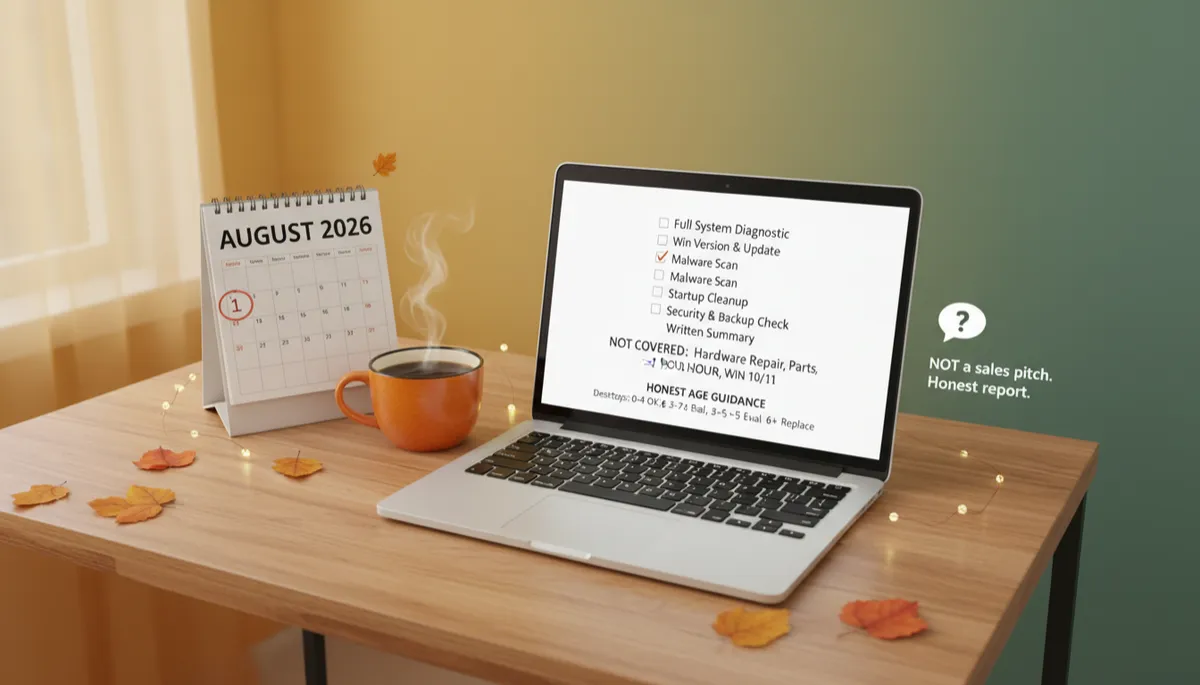
This back to school security review is built to give you peace of mind, not a bunch of tech jargon. During your remote session, we walk through a focused checklist on your Windows 10 or Windows 11 PC and leave you with a simple written report you can actually understand. Here's what's included:
- Full system diagnostic – We review overall health, storage space, performance, and signs of trouble so you know how your computer is really doing under the hood.
- Windows version and update check – We confirm you're on a supported version of Windows 10 or Windows 11 and check that important security updates are installed, closing easy doors for hackers and malware.
- Malware scan – We run a thorough scan for viruses, spyware, and other unwanted software, then help clean up anything suspicious we find during the session.
- Startup cleanup – Too many programs starting with Windows can make a newer computer feel old. We review what's loading at startup and safely trim the list so your system boots faster and feels more responsive.
- Security and backup check – We look at antivirus status, firewall settings, and backup options so you know whether your files are protected if something goes wrong, like a hard drive failure or accidental deletion.
- Written summary of findings – After the call, you receive a short, plain-English summary: what we checked, what we found, and what we recommend next. No scare tactics, just facts and options.
What's Not Included (and Why That Matters)
To keep this offer simple and affordable, some things are not part of the $50 review. Being upfront about that is important:
- Hardware repair – If your computer has a broken screen, dead power supply, failing hard drive, or other physical problem, that requires a separate scheduled drop-off appointment at our standard rates.
- Parts and upgrades – New drives, extra memory, or other components are not included in the $50 fee. If we think an upgrade would help, we'll explain why and give you options, but you decide what to do and when.
- Data recovery – If your computer won't start or a drive has already failed, that's a different kind of project. We do offer data recovery, but it's handled as a separate service with its own pricing and turnaround time.
If we discover that you need any of these services, we'll spell that out in your written summary and talk through next steps. There's no surprise bill tacked onto your computer security check.
How the Remote Session Works (No In‑Person Visit Needed)
The $50 computer tune up is done entirely online, using Zoom remote support. You can be at home in Madison Heights, at your office in Ferndale, or working from a coffee shop in Royal Oak—as long as you have internet, we can help. Here's the basic flow:
- Book your slot – Starting August 1, 2026, visit connectedgeek.net/backtoschool to choose a date and time between August 1 and October 31 that fits your schedule.
- Join a Zoom call – At your appointment time, you'll click a Zoom link we send. We'll guide you through a quick, secure remote connection so we can see your screen and run the checks together.
- Spend about an hour together – Most reviews take around 60 minutes. You can watch everything we do, ask questions, or step away while we work—your choice.
This service is specifically for Windows 10 and Windows 11 desktops and laptops. If you're not sure what you have, we can help you check before you book.
Is Your Computer Too Old? Honest Age Guidance
One of the most common questions we hear is, "Is this thing even worth fixing?" As part of your back to school security review, we give you straightforward guidance based on the age and condition of your device.
- Desktops: Generally in good shape from 0–4 years. From 5–7 years, it's worth evaluating: a tune-up or small upgrade may buy you more time. At 8+ years, we'll talk honestly about when it makes sense to start planning a replacement instead of pouring money into repairs.
- Laptops: Usually solid from 0–3 years. Between 3–5 years, we look more closely at battery health, storage, and performance. At 6+ years, many laptops are nearing the end of their practical life, especially for students and remote workers who rely on them every day.
Age isn't the only factor, but it's a helpful starting point. Our goal is to help you make smart decisions, whether that means squeezing another year out of your current machine or planning ahead for a new one.
Is This Just a Sales Pitch for a New Computer?
Short answer: no. This offer is meant to be a low-cost, low-stress way to get an honest snapshot of your computer before the school year ramps up. There is no pressure to buy a new computer, sign up for a subscription, or approve extra work on the spot.
We can't promise a specific outcome. Some computers will feel dramatically better after a cleanup. Others may still be slow because the hardware is simply too old. Either way, you'll get a clear written report that explains:
- What we checked and what we found
- What we fixed during the session
- Any risks or concerns you should know about
- Practical next steps, with rough cost ranges if you choose to do more later
You can take that report, think it over, and decide what's right for your family or business. If you want help from Connected Geek later, great. If you don't, that's fine too—you still got value from a clear, professional computer security check.
Who This Offer Is Perfect For in Southeast Michigan
- Homeowners getting kids ready for online homework, virtual classrooms, or college.
- Remote workers who rely on a single laptop or desktop to stay connected and productive every day.
- Small business owners in Madison Heights and the surrounding area who want a quick, affordable checkup before the busy fall season.
If you've been meaning to call a local Madison Heights IT support company but keep putting it off, this is an easy first step with a fixed price and clear expectations.
Ready to Book Your $50 Back to School Security Review?
Slots for this special offer are limited and only available from August 1 through October 31, 2026. To reserve your time with Connected Geek, visit:
connectedgeek.net/backtoschool
Give yourself one less thing to worry about this fall. A simple, friendly review today can help keep your Windows computer safer, smoother, and ready for the school year ahead.
